Disclaimer: This method is not officially supported by Famly. I take no responsibility for any issues, errors, or policy breaches that may arise from using this download process. Proceed at your own risk.
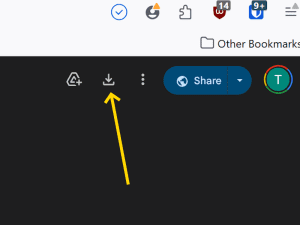
On the Google Drive page, look to the top right corner or similar.
Download the 3 files.
Click the Download button (down arrow icon).
The files will download to your computer, usually into your Downloads folder.
Step 2 - Locate The Folder
Find the folder where you downloaded the following 3 files. Inside it should contain:
background.js
content.js
manifest.json
Step 3 - Open Firefox and Install Extension
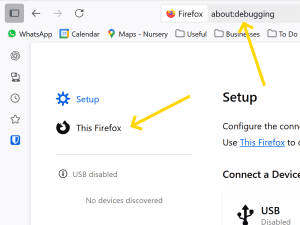
Open Firefox and type about:debugging into the address bar, then press Enter.
On the left-hand side of the page, click This Firefox.
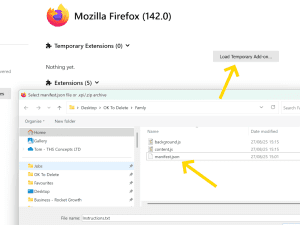
Click the Load Temporary Add-Ons button.
Navigate to the folder where you previously downloaded and unzipped the extension, then select the file named manifest.json.
If loaded correctly, you will now see Famly Photo Downloader listed under Temporary Extensions.
Note: Temporary extensions only remain active until Firefox is closed. You will need to repeat these steps each time you restart Firefox.
Step 4 - Login to Famly and Enter Photo Gallery
Log in to Famly using Firefox and select your child’s profile. Open the photo gallery, which may take some time to load depending on the number of photos. Once it has loaded, you can scroll through the gallery using the left and right arrow buttons.
Step 5 - Change Firefox To Mobile View
On the Famly Gallery page:
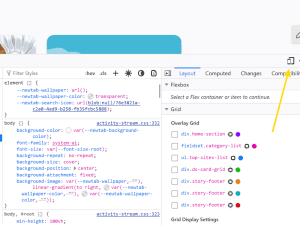
Click the F12 button (firefox developer tools)
Click the mobile button (see image below)
This changes your screen to a mobile phone view.
Step 6 - Run The Downloader Add On
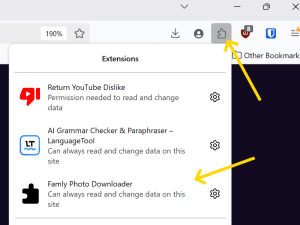
Whilst you are on the gallery page, go to the top right-hand corner of Firefox and click the puzzle piece icon to view your installed extensions. Select “Famly Photo Downloader” from the list. This will start downloading the photos.
Please keep your browser window open and your laptop switched on while the process runs. If you close the browser or power down your laptop, the download will fail.
Step 7 - Check Its Downloading
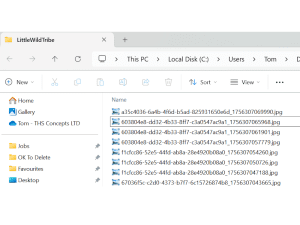
The downloads should save to your Download file into a folder called “LittleWildTribe” in my example the folder can be found here:
C:\Users\Suzie\Downloads\LittleWildTribe
There we go, that should be it!
Celebrate Your Pregnancy Journey
At Sculpt3D, we capture the beauty of pregnancy with bespoke 3D scans and personalised sculptures. A timeless keepsake, made just for you.